
Overlays, hats, glasses & masks
At a glance
Choose a full-face graphic, a custom image, or a stack of built-in accessories. Placement follows detected facial landmarks and needs review on difficult faces.
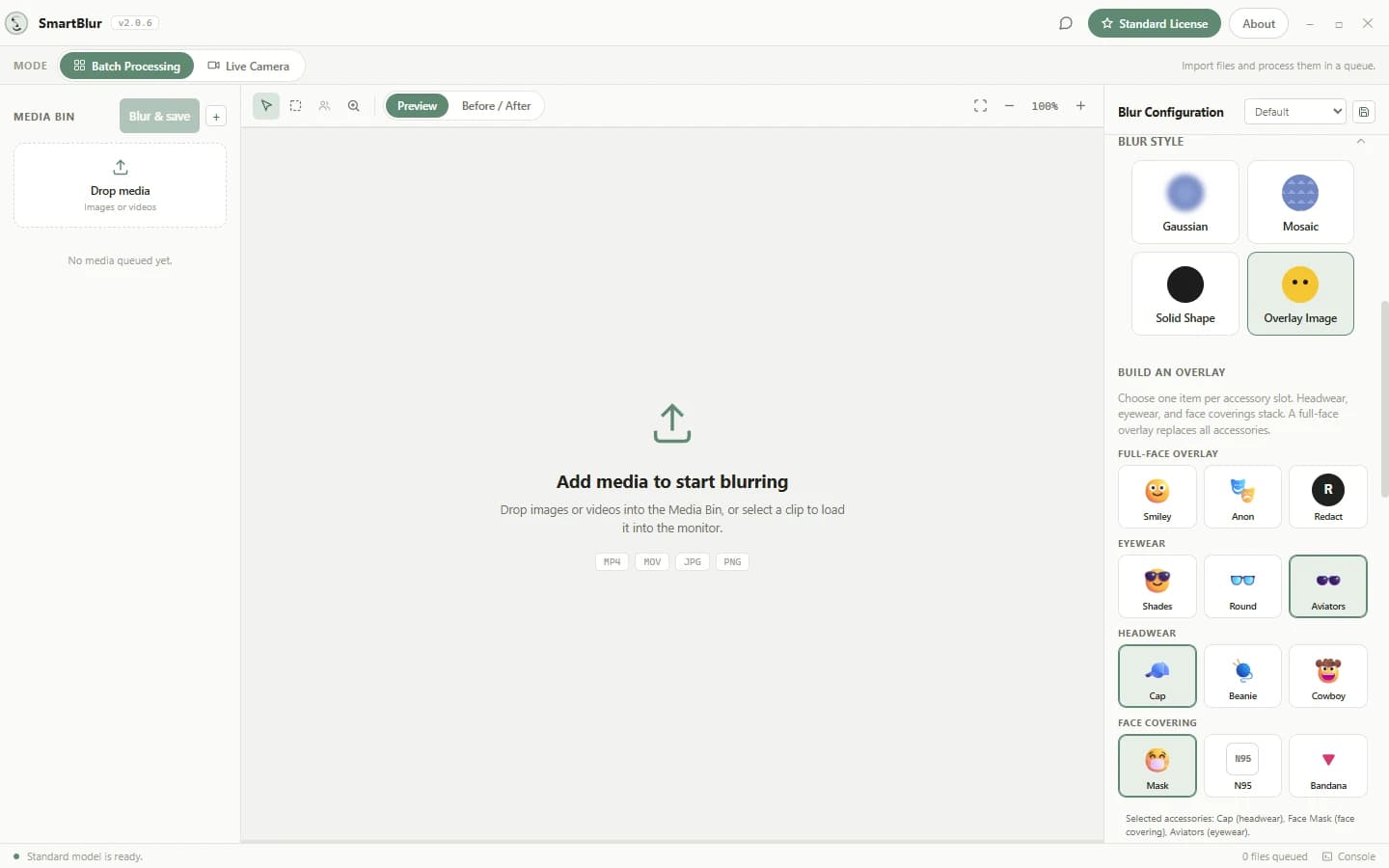
Step by step
- 01
Open a photo or video and choose Overlay Image as the effect. Open the overlay builder to see the available options.
- 02
Choose one item in each accessory slot: headwear, eyewear, and a face covering. A new selection replaces the previous item in that slot.
- 03
A full-face or custom image uses a separate exclusive slot. Choosing it replaces the accessory stack; choosing an accessory replaces the full-face image.
- 04
Process and review the saved output. Check side profiles, small faces, motion, and scene changes. Reprocess after changing accessories.
Before you share
Decorative glasses or hats do not conceal a whole face. For stronger visual coverage, use a suitable blur, mosaic, or opaque shape and inspect every intended region.
Full desktop guide (English)
Add Sunglasses, Hats & Masks to Faces
Yes, SmartBlur can automatically place built-in sunglasses, hats, and face coverings on detected faces. The Overlay Image style aligns each item to facial landmarks and performs the work locally with the rest of the desktop processing pipeline.
Plans and supported workflows
Layered face accessories do not require a separate Pro upgrade. They are available on Free, Standard, and Pro for supported photo, video, and batch processing, subject to each plan's normal file, model, and detection limits.
The same overlay settings also work during an entitled live session: Standard or Pro can use a local webcam, while RTSP/RTSPS input requires Pro. Processed live recording remains Pro-only. Always monitor live placement and review saved output because detection and landmark alignment are probabilistic.
Available accessory slots
| Slot | Built-in choices | Stack behavior |
|---|---|---|
| Eyewear | Sunglasses, Round Glasses, Aviators | Choose one |
| Headwear | Cap, Beanie, Cowboy Hat | Choose one |
| Face covering | Mask, N95, Bandana | Choose one |
You can combine one choice from each slot, for up to three accessories on the same detected face. Selecting a different item in a slot replaces the current item in that slot.
Build an accessory stack
- Add a photo or video and choose Overlay Image as the blur style.
- Open the overlay builder.
- Choose an eyewear item, headwear item, a face covering, or any combination of the three slots.
- Click Blur & save to process the current selection.
- Review Before & After and open the saved output. Check the fit on every visible face and several timestamps for video.
- If you change an accessory selection, click Blur & save again and review the new saved result before sharing it.
Face angle, occlusion, motion blur, lighting, and a missed detection can affect placement. Adjust detection confidence, model, 360° Detection, and padding when the underlying detection needs improvement.
Full-face and custom overlays are exclusive
A full-face built-in overlay or custom uploaded image uses the exclusive overlay slot. It does not stack with eyewear, headwear, or face-covering selections. Switching to a full-face or custom overlay clears the accessory stack; choosing an accessory clears the exclusive overlay.
This keeps the visible result predictable and prevents a custom graphic from unexpectedly covering or hiding a layered accessory.
Review checklist
- Confirm each intended face was detected before judging accessory placement.
- Inspect small, angled, partially hidden, and fast-moving faces.
- Review multiple video timestamps and every scene change.
- Make sure the chosen accessory covers the area required by your privacy policy.
- Use Gaussian, Mosaic, or Solid Shape when decorative coverage is not sufficient for the risk level.
- Treat every automatic result as requiring human review; an accessory is not a legal-compliance guarantee.
Common questions
Can I stack sunglasses, a hat, and a mask on one face?
Yes. Choose one eyewear item, one headwear item, and one face covering for up to three simultaneous layers. Choosing another item in the same slot replaces the earlier item.
Can a custom image stack with built-in accessories?
No. A custom image or built-in full-face overlay uses the exclusive overlay slot. Selecting it clears the accessory stack, and selecting an accessory clears the exclusive overlay.
Do face accessories guarantee anonymity?
No. Accessories are a visual treatment, not a guarantee that a person cannot be identified. Review every intended face and use Gaussian, Mosaic, or Solid Shape when the privacy risk requires stronger concealment.
Do face accessories work offline?
Yes. Built-in accessory placement and media processing run locally on the supported Windows PC or Apple silicon Mac; the source media is not uploaded for AI processing. Download, activation, periodic license validation, feedback, and update checks are separate network-connected operations.
For the other rendering styles, see Blur Effects. For missed or loose detections, see AI Detection.